Maths Interactive Whiteboard Array’s Week 8 Term 3 2025

WALT: Learn how to make fraction Array’s of different numbers on the Interactive Whiteboard. 

HIII BLOGGERS!!!!!!!! 😁

Today and Yesterday we got to make a Array in the Interactive Whiteboard! We had to choose 5 questions to do! The questions were all fractions! So we basically had to make an array of fractions. Which is sooo cool! At first I didn’t know how to do this because I found it hard. But now I know how to do it! We actually started it yesterday and today we got the whole Math’s lesson to finish it! I did all 5 questions today. I actually did one question yesterday, but I did the same one again so that its all in one screenshot!

HERE’s MY WORK BELOW!!! sry if this is a short blog post, but I will edit it later!

Maths Negative Number Line Numicon Week 5 Term 2 2025 (◕ᴗ◕✿)

WALT: understand negative number lines

HII BLOGGERS!!! 😄

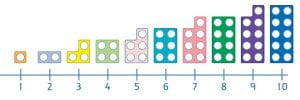
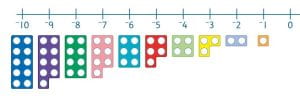
This week is week five of term two and we are learning about number lines! Ok so yesterday which was Tuesday, we used interactive whiteboard to do our Math’s work! I will tell you the steps for our work. So we had to firstly go onto the interactive whiteboard and we chose to do the widescreen. Mine wouldn’t work at first, but then I asked a friend and it worked! 🙂 So the interactive whiteboard thingy is on the Maths senior learning site. [it’s on the first slide when you click onto your Math’s teacher. I had to click onto Miss Ferguson, since she is my Maths teacher! She is the kindest teacher, she is also my homeroom teacher!!!! So I had to add something on my interactive whiteboard that helps me where to put my Numicon, because it was confusing! I loved this lesson it was easy to do! Now it’s Wednesday and I am blogging my work! The number lines were easy to do! Also there were numbers that are called negative numbers, and we had to put Numicon for the negative and normal numbers! The numbers will show in my work that I post! We also had to add it into our Math’s slides. We made a copy of aa Math’s slides and we decorated it on Google slides!

I HOPE YOU LIKED MY BLOG POST\ DESCRIPTION!!! BYEE FOR NOW!!! 🌺

REFLECTION FOR MATHS TASK: I think that this Math’s task was really easy and fun to do! Maybe next time I can improve on nothing! Because I basically did everything really good!! So in total I will rate this create task a…. 9.5\10! I really liked it and I hope we do this task again.!!

HERE IS MY MATHS TASK! Which is the interactive whiteboard one where you had to add the Numicon for negative and normal numbers!I HOPE YOU LIKE IT!!!! (づ。◕‿‿◕。)づ

[👇 my work is down below! 👇]

NORMAL NUMBERS!                                                 NEGATIVE NUMBERS!

Maths – Swimming Taskboard Term 1 Week 9

🙋Hi Bloggers!

Last week and this week we had swimming! We had four Must-Do’s and three can-Do’s. The four Must-Do’s were: Reading, Writing, Maths, and Winter Sports. For Maths we had to do Problem Solving. There were three links.

One link is for teacher Aids, one link is for Book 3, and the last link is for Book 4. I’m in Book 4. For Book 4 there are 19 slides you have to complete. Each slide gets harder and harder.

You have to type up the answers in full sentences. There are different problem solving questions for each link. One of the questions for my slideshow was: A gardener has 7 bags of compost to spread evenly over 4 flower beds. How many bags of compost does each bed get? That question was on slide 2. Which was the first Problem Solving question.

On Friday of week ten we had to get our slideshow checked off by a buddy. Check my slideshows if I got them all correct!

Do you like Friday Maths? Tell me in the Blog comments.

I like doing the swimming Taskboard. It’s fun to do.

Maybe next time I can improve on 2 things. The first thing I could improve on is typing a longer blog post. Because I typed up less today. The second thing I can improve on is, trying harder for Maths. Because I didn’t try that hard. But I think I did well.

[I will be blogging all of the Must-Do’s separately]

UPDATE: I will update my post once I’ve finished it. 😁


Amber’s 100 Boards Pattern Term 3 Week 6

WALT: Learning to skip count in 2s, 3s, and 4s.

Hi Bloggers!

Today for Maths we looked at Patterns on our 100’s board. We had to do it on our Interactive Whiteboard. An Interactive Whiteboard is like where you can use different types of Math materiel’s like Numicon, Rods, 100’s Board, and a Keyboard. We mostly use the keyboard for typing. So what we had to do was we had to first get into our Interactive Whiteboard, next we had to get the 100’s board and put in the Numbers, after we had to color in the numbers of the two, three, and the four times table. We could use any color to highlight the numbers. After we finished the tables, then we had to take a screenshot of our work. Once we had done clicking the screenshot we had to make a copy of the Pattern slide. Once we had made the copy of the slides, we had to drag our three screenshots into the boxes. We also had to write a description about the times table. Then after we had done that, we had to Blog our work. I had fun doing Maths. i think i can improve on not making a mistake in my highlighting, because i did make a mistake.

Update: I will update my work once I’ve finished it.

Amber’s Numicon Staircase

WALT: Patterns that increase and decrease by 1

Hi Bloggers!

Today for Maths we learned how to increase and decrease numbers by 1. We did a Numicon and a Rod staircase. The first staircase that I did was the Numicon and then I did the Rod staircase second. We had to make the number up to 20 or more if you wanted to. But I did just 20. The different things from the staircases were, that the Numicon has holes and the Rods don’t have holes. The other thing I noticed was that the Numicons colors are different then the Rods. It was fun I really liked to make the staircase. Next time I think I can improve on not making a mistake, and doing a higher number then twenty.

UPDATE: I will update my post once I have finished it. 🙂


Hello world!

Welcome to your brand new blog – a space to share your learning journey.

To get started, simply visit your blog’s dashboard, edit or delete this post and check out all the other options available to you.

Like more help?

We can walk you through step-by-step in our guide to getting started with your blog.

You can see what other learners are sharing on their blogs here.

Happy blogging!